Start free. Upgrade when your PDFs need more.
Smart PDF Pilot is a desktop app for your Mac. Edit, sign, draw and view for free, then add Pro for saving, export and page tools.
- Mac desktop app
- Free plan included
- Billed through the Mac App Store
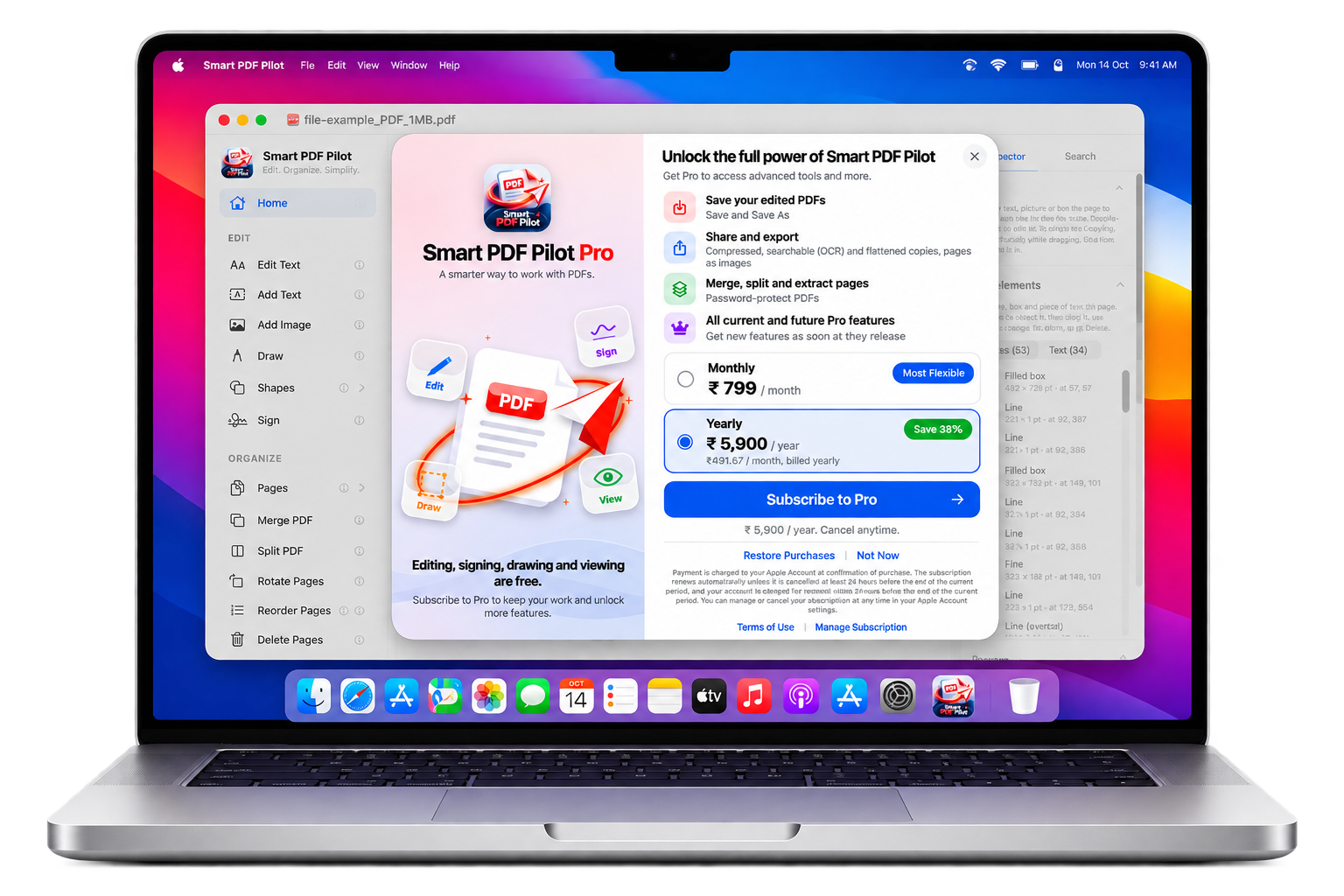
Free, Pro Monthly or Pro Yearly.
Everyday PDF tasks are covered by Free. Pro adds the advanced tools for people who work with documents regularly.
| Editing, signing, drawing and viewing are free. Pro adds saving, export and page tools. | FREEFree₹0No subscription | PROPro Monthly₹799/ monthBilled monthly. Cancel anytime. | BEST VALUE · SAVE 38%Pro Yearly₹5,900/ year₹491.67 / month, billed yearly. Cancel anytime. |
|---|---|---|---|
| Edit text and images | ✓ | ✓ | ✓ |
| Add text and images | ✓ | ✓ | ✓ |
| Draw shapes and freehand | ✓ | ✓ | ✓ |
| Sign your PDFs | ✓ | ✓ | ✓ |
| View documents | ✓ | ✓ | ✓ |
| Save and Save As for your edited PDFs | — | ✓ | ✓ |
| Share and export: compressed, searchable (OCR) and flattened copies, pages as images | — | ✓ | ✓ |
| Merge, split and extract pages | — | ✓ | ✓ |
| Password-protect PDFs | — | ✓ | ✓ |
| All current and future Pro features | — | ✓ | ✓ |

Download free, then subscribe to Pro inside the app.
Prices shown are for India (Monthly ₹799, Yearly ₹5,900). The final price and currency are shown in the Mac App Store before you buy. Subscriptions renew automatically and can be managed or cancelled in your Apple Account. Questions about plans? Contact us.
From download to Pro, all through the Mac App Store.
There is no website account to create and no browser editor to open. Smart PDF Pilot lives on your Mac.
-
01
Download the app
Get Smart PDF Pilot from the Mac App Store. Editing, signing, drawing and viewing are free as soon as it is installed.
-
02
Work with your PDFs
Open a document and use the editing, drawing and signing tools on your desktop.
-
03
Upgrade to Pro if you need more
Choose Pro when you want to save your edits, export, merge and split pages or password-protect PDFs. Apple handles the purchase.
Answers about plans and buying.
How the Free and Pro plans work, where you buy them, and what to expect from a Mac desktop app.
Explore features → Smart PDF Pilot
Edit. Organize. Simplify.
Made for Mac
Smart PDF Pilot
Edit. Organize. Simplify.
Made for Mac
Where do I get Smart PDF Pilot?
Smart PDF Pilot is available on the Mac App Store. Use the Download on the App Store button on this page to open the listing.
What is included in the Free plan?
The Free plan lets you edit, draw, sign and view PDFs in the Mac app. It costs nothing to get started.
What does Pro add?
Pro includes everything in Free, plus saving your edited PDFs, share and export options (including OCR), merge, split and extract pages, and password protection. It costs ₹799 per month or ₹5,900 per year in India.
How do I pay for Pro?
Pro is purchased through the Mac App Store, so Apple handles billing. Choose Monthly or Yearly (Save 38%) in the app. The price and currency shown in the App Store at checkout are the ones that apply to you.
How do I manage or cancel my subscription?
Subscriptions bought through the Mac App Store are managed in your Apple Account settings, where you can review or cancel them.
Is Smart PDF Pilot a browser-based PDF editor?
No. Smart PDF Pilot is a Mac desktop app. You install it on your Mac and work with your PDFs in the app, not in a browser tab.
Do I need an account on this website?
No. You download the app from the Mac App Store, and purchases are handled by Apple.
Is there a team or business plan?
Not at the moment. Smart PDF Pilot currently has two plans, Free and Pro. If you have a question about using it at work, please contact us.
Download Smart PDF Pilot and try it free.
Try the free plan on your Mac. Upgrade to Pro from the Mac App Store when you need the advanced tools.